
Position-tracked investments
Use position tracking when one brokerage or investment account contains cash plus one or more long-only stocks, ETFs, or directly priced funds. Wealthboard replays source records for cash and quantity, then derives value from the latest effective price and exchange rate available on the requested date.
Record keeping, not trading or tax software
Position accounts do not place orders, synchronize with a broker, calculate tax lots or realized gains, or supply live market prices. Record or import only activity that a trusted source confirms.
Choose the tracking method
Select the method when creating the account.
| Method | Use it for | Authoritative value |
|---|---|---|
| Account value | Cash, property, vehicles, liabilities, unsupported investments, or one manually valued holding | Monetary transactions and absolute valuations |
| Units and prices | A brokerage cash ledger with long-only stocks, ETFs, or directly priced funds | Cash transactions, position events, security prices, and effective exchange rates |
An account cannot switch methods through normal editing. Use the guided conversion workflow when an existing investible balance account needs explicit units and prices.
Create a position account
- Open Accounts → Add account.
- Choose an active investment category such as Securities.
- Select Units and prices.
- Choose the permanent account currency and enter opening broker cash.
- Create or select an instrument.
- Record an opening position with its explicit quantity and optional reference cost basis.
- Add an effective-dated unit price.
Leave Fee amount, Cash effect, and Applied exchange rate empty for opening positions and quantity adjustments. Those fields describe cash-settled buys and sells, not an opening holding; the form starts with no fee.
An instrument has its own identity, symbol, type, quote currency, and optional exchange or MIC. A ticker is not globally unique, so include the exchange or a stable identifier when the source provides one.
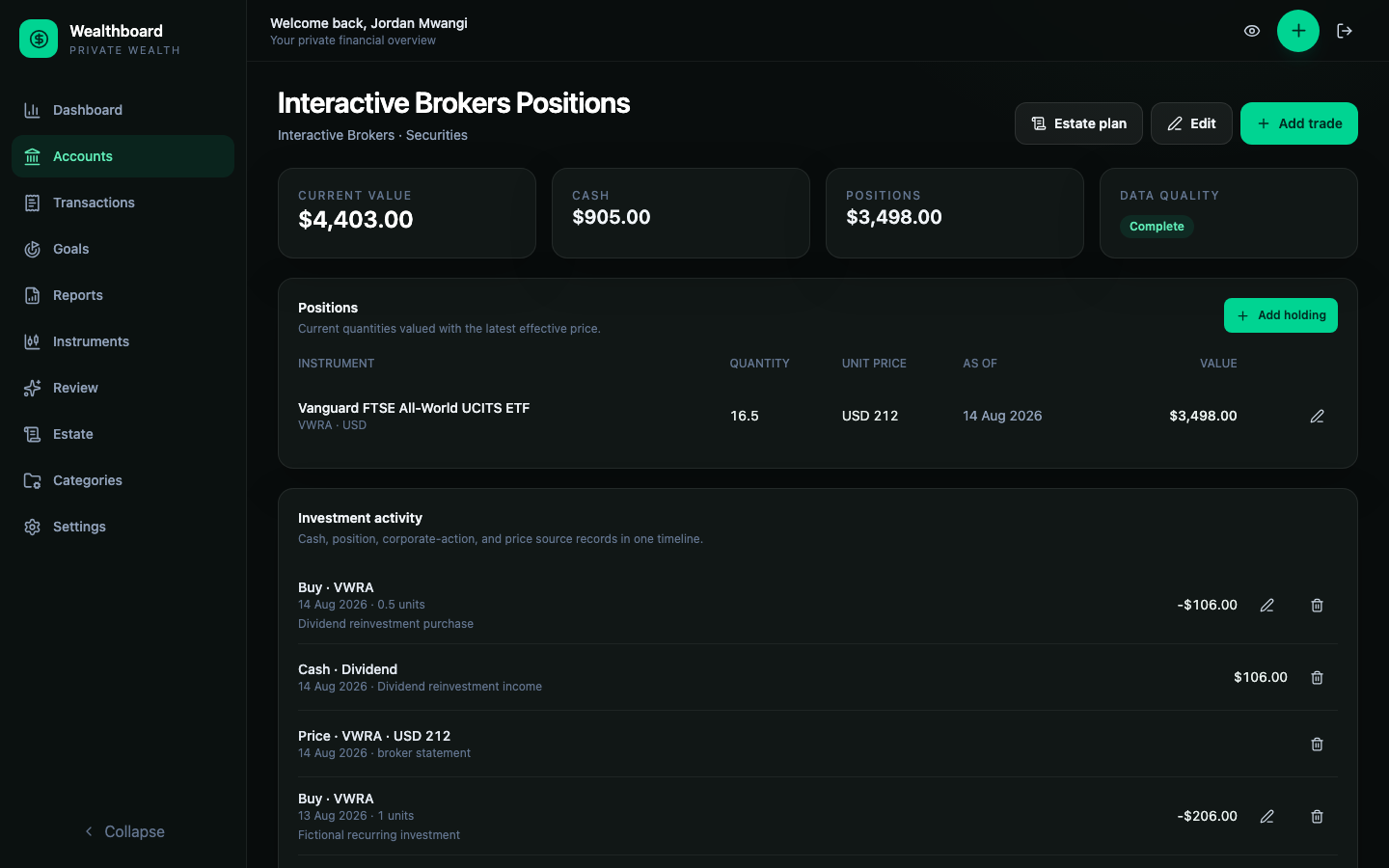
The current account value is:
- replayed account-currency cash;
- plus each replayed quantity multiplied by its effective unit price;
- converted into the account currency when the instrument is quoted elsewhere.
For a foreign-currency account, Base-currency value shows that same current account total in your configured base currency. Current value and Cash remain in the account currency. A missing exchange rate is shown as incomplete, not as zero. Account lists and detail pages use the same Go calculation and owner-scoped, effective-dated rates for base-currency values.
The Positions table keeps each security's quantity separate and shows its effective unit price, date, source, and account-currency value. Use Add holding for an opening position, Add instrument for a new security reference, and the price edit control on a row to update that specific security. Prices are shared by all of your accounts holding that instrument.
Review investment history
Investment activity combines cash transactions, position events, corporate actions, and price observations in one newest-first timeline. Use Previous and Next to browse older records; the selected page remains in the URL. Ordinary position events can be opened directly for correction, including events older than the first page of history. Grouped and corporate-action records remain managed through their dedicated workflows.
Permanently delete an instrument
Open Instruments and select the instrument's delete control. Confirming permanently removes the instrument and all its saved prices. Both active and archived instruments can be deleted when no account history references them.
Closed holdings, archived accounts, and related corporate-action records still count as account links. Remove the linked position activity or permanently delete the linked accounts before deleting the instrument. Archiving an account alone does not remove those links. Previously downloaded backups and saved estate snapshots are not rewritten.
Record buys and sells
Use Buy or Sell from the position account. Do not use the generic balance-account Purchase or Sale transaction types.
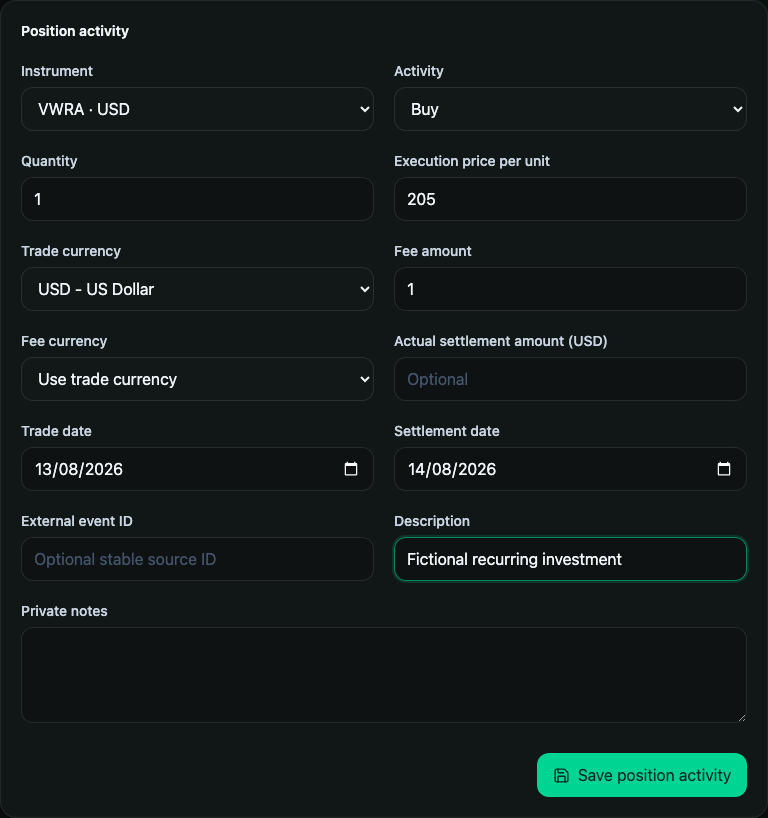
- A buy increases quantity and reduces account cash by settlement plus fees.
- A sale decreases quantity and increases account cash by proceeds less fees.
- Buys and sells exchange cash for units inside one account. They are not external contributions or withdrawals.
- Backdated changes replay the complete later sequence. A mutation that makes quantity negative at any point is rejected without a partial write.
For a cross-currency trade, enter either the actual settlement in the account currency or the applied settlement rate. Wealthboard does not substitute a later portfolio reporting rate for the broker's trade settlement. An applied rate is invalid when trade and account currency are the same. An explicit settlement is the complete net cash movement, including fees; the fee field does not add another charge to that supplied amount.
Record cash and dividend reinvestment
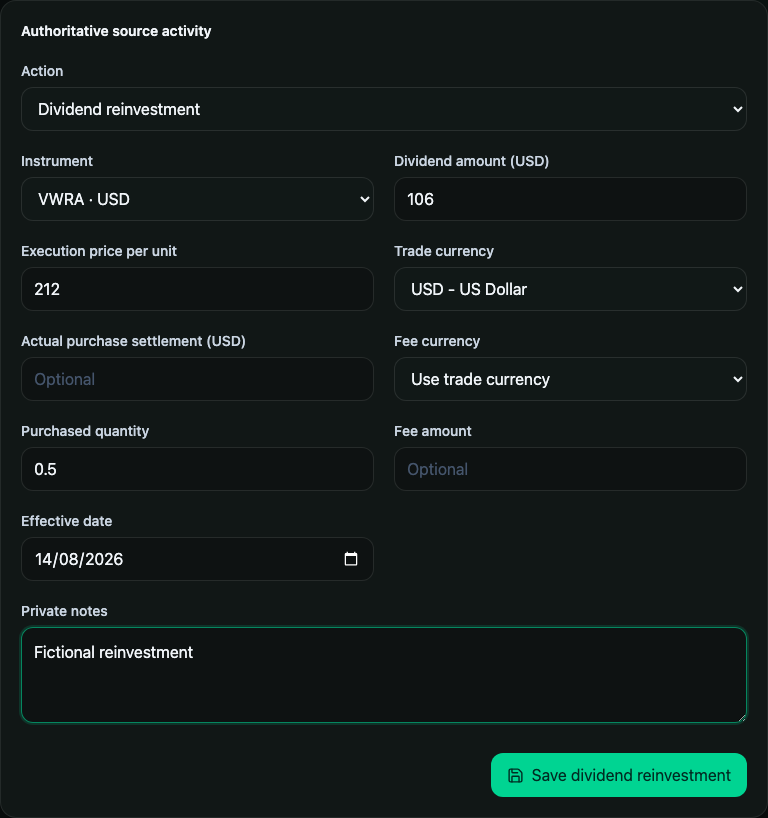
Deposits, withdrawals, interest, cash dividends, fees, and signed cash adjustments belong to the account cash subledger. A cash dividend alone does not add units.
Use Reinvest when one dividend immediately purchases units. Wealthboard stores the dividend cash row and the buy as one grouped economic event. Saving, deleting, restoring, or importing the group is atomic.
Transfer units and record corporate actions
Open Investment action from the account and choose the source event that matches the statement.
| Action | Result |
|---|---|
| In-kind transfer | Writes paired transfer-out and transfer-in position events without treating the units as a contribution or sale |
| Stock split | Multiplies the quantity held at that point by the explicit new-to-existing share ratio |
| Spin-off | Adds an explicit quantity of a related instrument while retaining the source holding |
| Merger | Removes the source quantity and adds the resulting-instrument quantity as one grouped event |
These actions model quantity and account history. They do not infer tax basis, legal ownership, cash in lieu, fractional-share disposal, or jurisdictional tax treatment. Add separate confirmed cash or fee records when the statement shows them.
Historical edits, deletions, and imports are rejected when they would change the share entitlement of a recorded spin-off or merger. Remove the affected corporate action, correct the earlier holdings, then record the action again. If later actions depend on it, remove those actions in reverse chronological order first.
Maintain prices and freshness
Each price records the instrument, positive decimal unit price, effective date, source, optional stable external ID, and provenance.
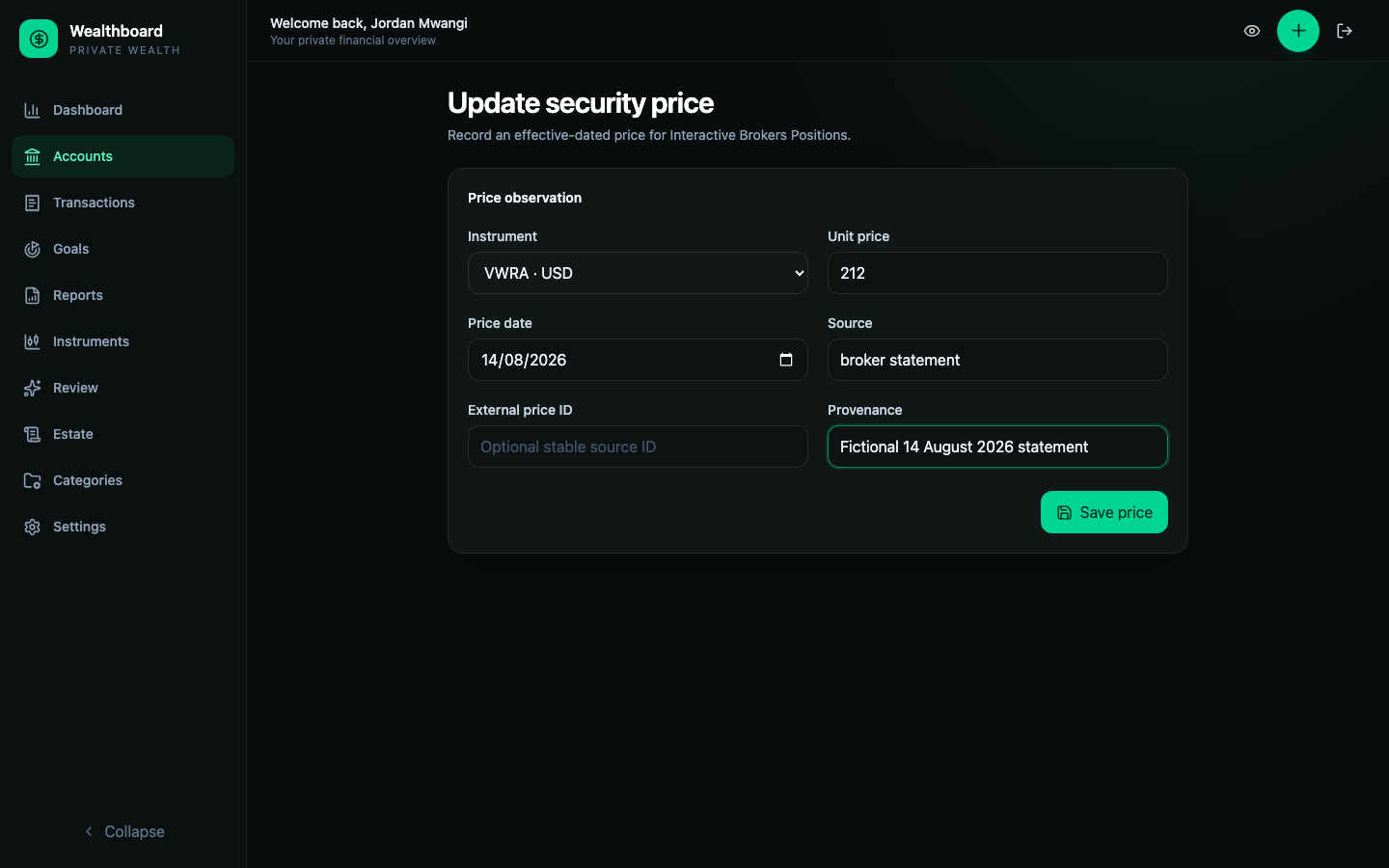
At any value date, Wealthboard uses the latest price effective on or before that date. It never uses a future price. An earlier price may be carried forward, but its original date and stale state remain visible.
After a stock split, add a quote dated on or after the split. A pre-split quote cannot value the new share count; the holding remains incomplete until a post-split quote is available. Earlier historical values are preserved.
Configure separate stock, ETF, and fund freshness thresholds under Settings → Preferences → Price freshness thresholds. The account's Positions table shows the instrument, quote currency, effective price date, source, and stale state. Account analytics, dashboard history, and reports flag incomplete values; the investment import report identifies missing prices and currencies. These views do not all provide detailed affected-date ranges.
An unresolved component is excluded from the partial numeric total and marks the result incomplete. Do not interpret that partial total as zero exposure.
Reconcile a broker statement
Choose Reconcile and record the statement date, reported total, optional reported cash, and notes. The current screen stores these observations and lists reported totals; it does not calculate a same-date cash/position difference. Compare the statement with the account history before recording any corrections.
A reconciliation observation is evidence for review. It never overwrites cash, quantity, prices, or the derived account value. Resolve differences by correcting the underlying source event or adding a confirmed missing record.
Convert an existing account
Use Convert on an active, investible Account value account. The workflow does not rewrite or infer historical units.
- Choose a conversion date no earlier than the account's latest activity.
- Enter explicit opening broker cash.
- Select an existing instrument and enter its quantity, unit price, and optional reference basis. The current web form accepts one holding and uses
conversionas the price source; the Go API supports multiple holdings. - Preview the source balance, opening cash, positions, projected total, and difference.
- Resolve the difference, or explicitly accept it when the source statement supports the replacement values.
- Confirm conversion.
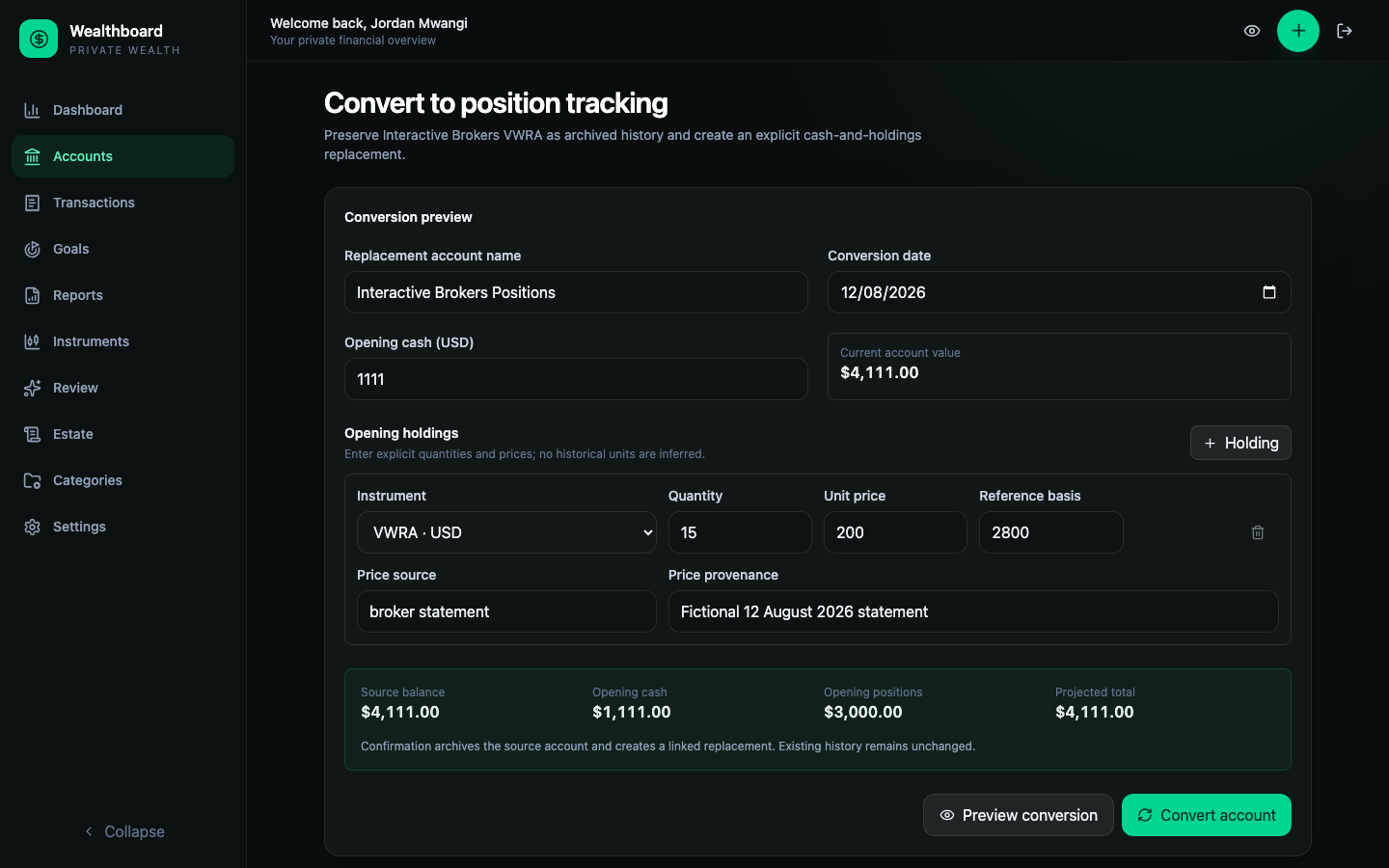
Confirmation archives the source effective on the conversion date and creates a linked position account. Earlier monetary history stays on the archived source. It remains in backup exports but is no longer included in financial views or historical totals. Existing goal and estate links move to the replacement atomically. The archived source cannot be restored while its conversion link remains, even if the replacement is archived.
Import investment history
Position accounts use Investment History v1, not Account History Import v1. The Go preview resolves instruments, replays every event in deterministic order, and returns before/after quantities, price effective dates, projected cash and positions, net change, duplicates, conflicts, oversells, and missing prices or rates. The page shows counts and the first 50 row outcomes. Download Report to inspect the complete preview before committing.
The optional Convert document with AI workflow extracts a source in your self-hosted instance, then asks for approval before sending selected source sections to your configured provider. The current import page does not expose the older copyable transformation prompts. Review the generated JSON through the same preview and commit workflow; see AI-assisted import. Use complete JSON when records are interdependent or a dividend and its reinvestment buys must share one atomic group.
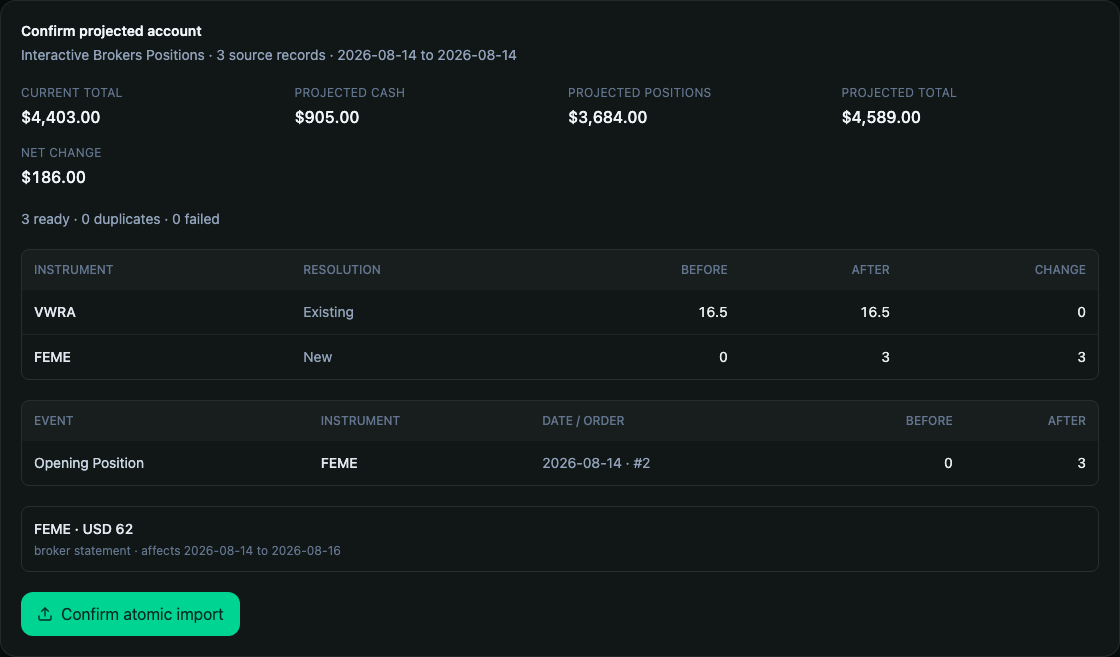
Confirmation reparses the SHA-256-confirmed file and writes the complete interdependent sequence in one transaction. See the exact fields, templates, and duplicate rules in Investment History v1.
An imported price belongs to the instrument, not just the selected account. It also refreshes the values of your other accounts holding that instrument.
Understand downstream values
- Goals currently read the linked account's cached value. Review goal valuation limitations before relying on progress.
- Estate planning retains account-based instructions, but does not yet perform complete effective-dated price and FX valuation. See Estate planning.
- Dashboard and reports include complete converted exposure and identify unresolved components.
- Movement attribution separates external cash, income, fees, internal trade cash, quantity, price, and currency movement.
Position movement attribution is an exact value bridge, not a return percentage. Annualized position return remains unavailable until a validated cash-flow-aware TWR methodology is implemented.
Privacy and supported scope
Privacy mode masks cash, quantities, unit prices, reference basis, and derived values. Instrument name, symbol, event type, and dates remain visible so the account can still be reconciled.
Use an Account value account for unsupported holdings. Position mode intentionally does not cover shorts, margin, options, derivatives, bonds quoted as a percentage of par, cryptocurrency wallets, multi-leg trades, automatic trading, tax-grade lots, or silent corporate-action inference.