
Reports and privacy
Reports summarize the same accounts, transactions, valuations, and exchange rates used by the dashboard.
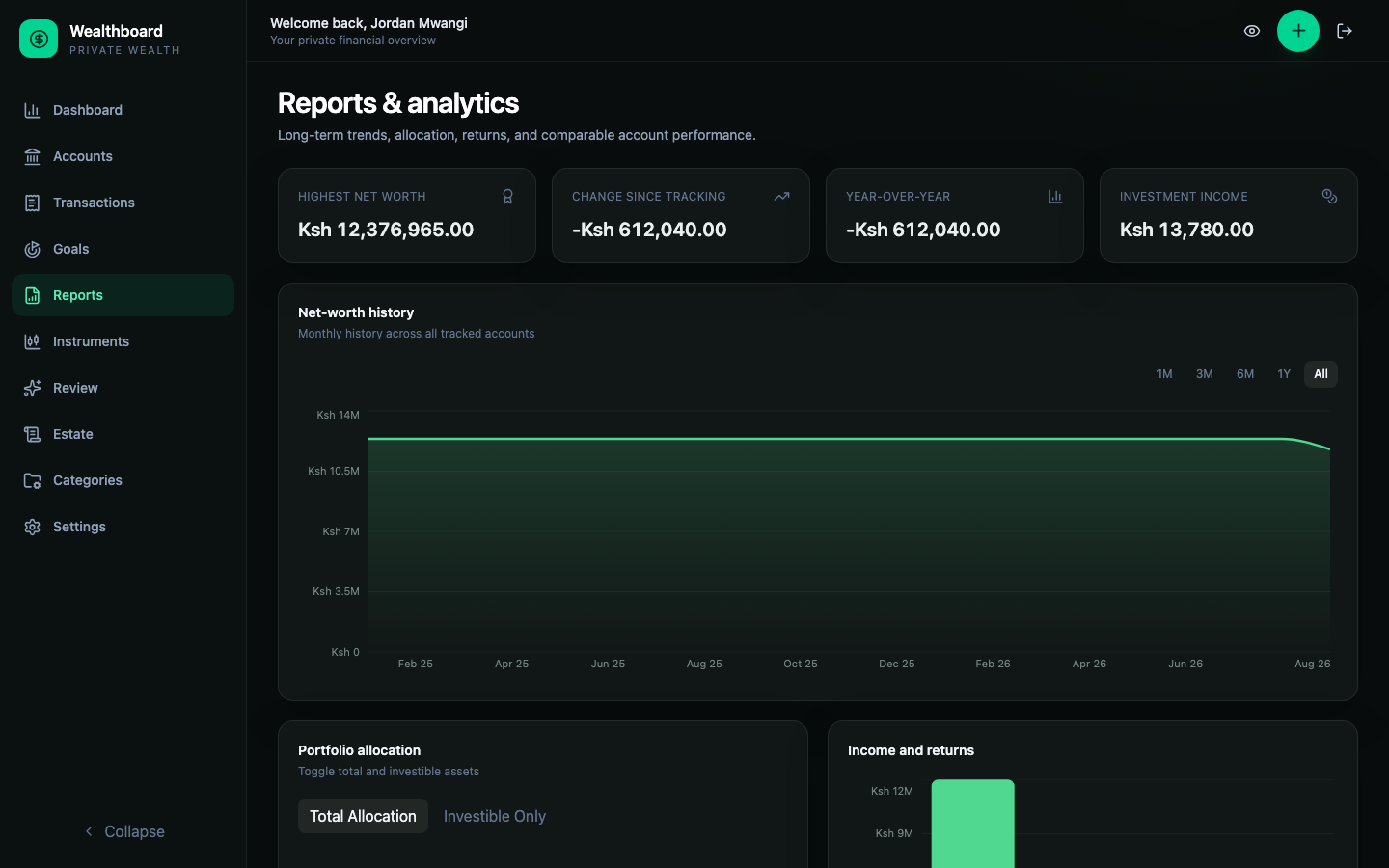
Net worth
Net worth is included assets minus included liabilities after conversion to the base currency. Dashboard period cards compare the current estimate with earlier replayed values.
A zero balance does not need an exchange rate. Adding a foreign-currency account does not make earlier history incomplete when that account held no cash or positions at the time. Nonzero balances still need a rate effective on the historical date, and held positions still need an effective security price.
Current and historical completeness are separate. A current total can be complete while earlier calculations lack a price or rate. Transaction-based contributions, income, and gains can also be affected.
The current screens show missing-currency and incomplete-history warnings, not per-pair affected-date ranges or prefilled Add earlier rate links. Open Settings → Exchange rates and enter an observation appropriate for the missing historical date rather than substituting today's rate.
Settings labels a rate Over a month old after 30 days. The rate still converts values where applicable; age alone does not make a total incomplete.
Managing exchange rates
Under Settings > Exchange rates, each currency pair has one summary row showing its most recently dated observation, date, and freshness. The rate is quote units per base unit: USD/KES 130 means one USD buys 130 KES. The inverse conversion is automatic; do not add KES/USD separately.
Use Add pair to add an observation, including a new date for an existing pair, while preserving older entries. Adding the same pair and date again is rejected rather than overwriting it.
Expand History to inspect or delete an entry. Deletion requires confirmation, then calculations fall back to an older applicable rate where available. Removing the only applicable rate can make current or historical totals incomplete.
Rate edits currently replace a record
The update icon and History edit control delete the selected observation before creating its replacement. This is not an atomic edit: a validation or network failure can leave the old entry deleted. Export your portfolio first and double-check the pair, date, and rate. Use Add pair, not update, when adding a new observation that must retain history.
Older data may contain entries in both directions; History groups them together. Review the direction shown on each entry. New reverse pairs are rejected because the inverse is calculated automatically. A future-dated observation may appear in the summary row, but financial calculations ignore it until it is effective.
For a position account, a missing security price has the same completeness effect. The unresolved component is excluded from the partial numeric total. Open the account's Positions table for instrument, quote currency, effective price date, source, and stale state. Resolve the source record before relying on the total.
Allocation
Allocation groups source accounts by category, institution, currency, liquidity, or investibility. Category settings therefore matter: changing a category can change reports without changing account history.
Contributions, income, gains, and fees
Contributions, income, and fees come from transaction classifications. Balance-account capital growth also includes valuation changes relative to the replayed balance. A valuation remains excluded from contribution and income totals because it is an absolute observation. Transfers move value within the portfolio and do not create net contributions.
Account comparison
Use account comparison as a review aid, not a broker-grade performance statement. Cash-flow timing and sparse valuations can limit what can be inferred from a balance history. Always read the displayed period and methodology notes.
Position movement attribution
Position accounts include a deterministic bridge from starting value to ending value.
| Component | Meaning |
|---|---|
| External cash | Deposits and withdrawals entering or leaving the account |
| Income | Interest and cash dividends |
| Fees / cash adjustments | Explicit costs and signed cash corrections |
| Internal trade cash | Cash exchanged for buys and sells inside the account |
| Quantity changes | Unit changes valued at the bridge's starting price |
| Price movement | Price change applied to ending quantity |
| Currency movement | The exact remaining effect of quote/account/base FX changes |
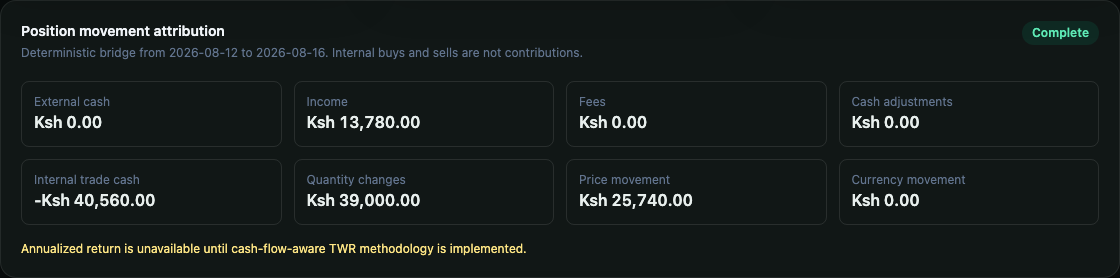
Internal buys and sells are not contributions. The bridge is attribution, not a return percentage or tax-gain calculation. Annualized position return remains unavailable until Wealthboard has a validated cash-flow-aware TWR methodology.
Privacy mode
Select the eye icon in the header to mask financial values across protected screens. The setting is stored in the current browser.
Privacy mode does not remove data from the server or from a user export. It is a display safeguard for screen sharing and shared devices. Log out when finished; logout clears user-specific client state. Browser appearance is retained separately.
For position accounts, privacy mode masks cash, quantities, prices, reference basis, movement amounts, and derived values. Instrument names, symbols, dates, and source-event types remain visible so a hidden-value screen can still be reconciled.
AI portfolio review
The optional Review workspace sends a bounded, deterministic portfolio snapshot to the provider configured under Settings. The model explains supplied evidence; it does not calculate authoritative balances or execute financial changes.
Before generating a review, inspect the “Data sent to the provider” panel and the exact-amount/account-name sharing choices. Provider retention and billing remain subject to that provider's terms.